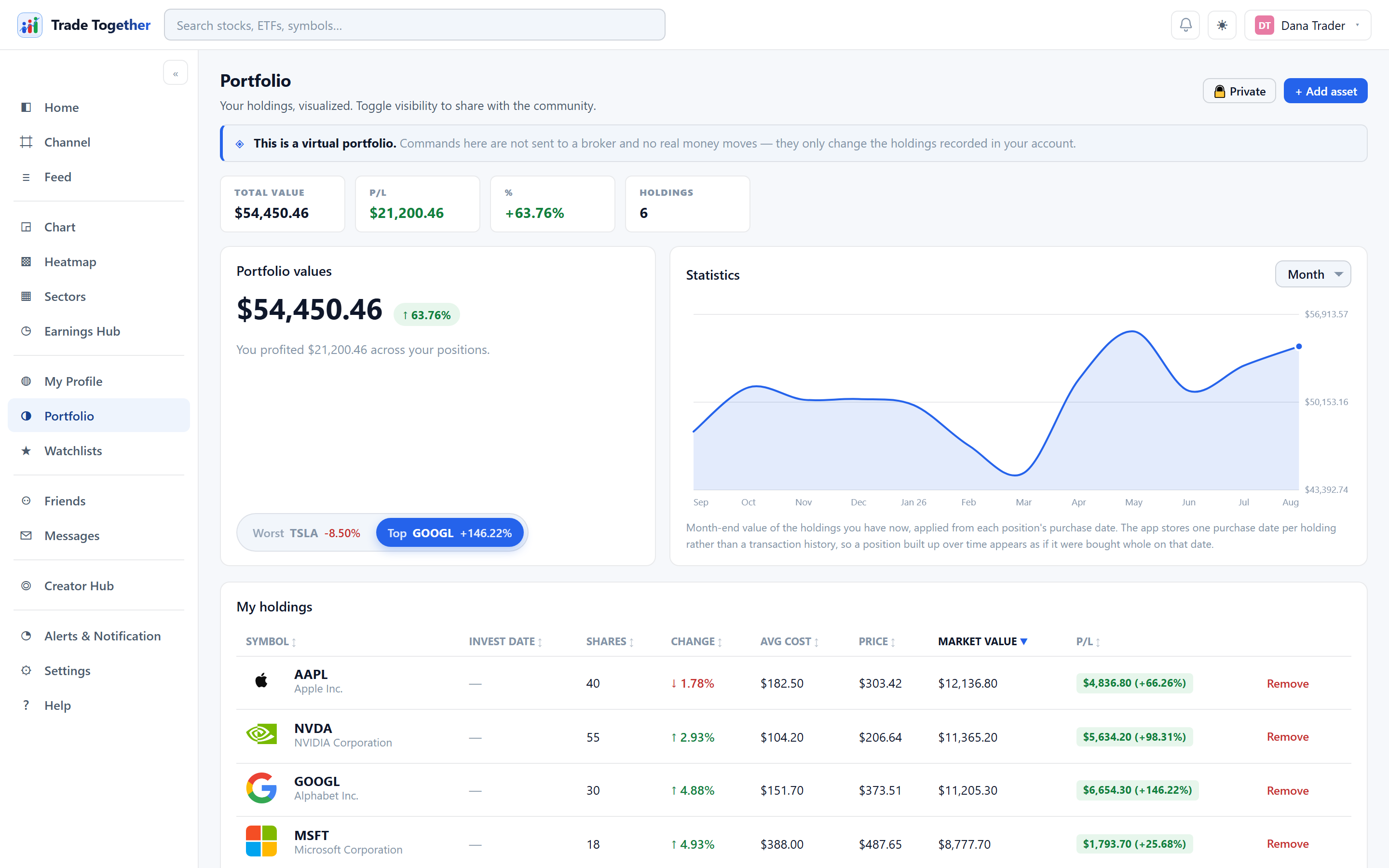
What you hold, what it is worth, and how it has done. Like your first watchlist, your first portfolio starts empty.
Every position here is virtual. Adding an asset records that you hold it; it does not buy anything. See chapter 1.
Where the two lines come from — they are not the same kind of thing. The verified line is replayed from your trade log: every fill, in the order it happened, valued at what those shares were worth in each period. So a position you opened in March and closed in May still shows in March, April and May, and disappears afterwards — because that is what happened.
The not-verified line cannot work that way, and it is worth knowing why. A holding you recorded yourself has no transaction history behind it — there is one row, with one date and one share count — so that line is worked backwards from what you hold today. A position you built up over months appears as though it were bought whole on its recorded date. We could invent a smoother path, and it would be a guess wearing the same colour as a fact.
Neither line includes cash. This is what the holdings were worth, not what an account was worth, so a period when you held nothing reads as zero rather than as the money a sale returned.
12.1 Verified and not verified
Your portfolio is two sets of positions, and the page never mixes them:
- Verified — tracked with us
- Positions created through commands (market, limit, stop). The app supplies the price from its own live quote and stamps the time itself; every fill is written to the trade log, which nobody can edit — including you, and including administrators. These are the only positions that count towards the headline figures, the best and worst performer, the value chart, and anything another member can see about your performance.
- Not verified — recorded by you
- Positions you type in yourself: any price, any past date. Meant for the portfolio you already had before joining. Shown to you in full — value, P/L, the lot — but always marked in orange, always labelled, and never counted in any verified figure. Other people see that these positions exist and what they are worth, with the label carrying the weight.
The boundary is your join date — the day your account was created, a date the server wrote and nobody can move. Everything you do through commands from that day on builds a record we can vouch for; everything from before is yours to track, and the app simply refuses to pretend it witnessed it.
Why so strict? Because a public portfolio is this app's proof of skill. A number anyone could have typed in is not evidence, no matter how honestly it was typed — so the app splits what it saw happen from what it was told, and says which is which everywhere both appear.
12.2 Adding a position
+ Add asset opens a form that asks three separate questions:
- 1 · Verified, or not verified?
- Two cards at the top. Verified — happening now means the app prices and dates the trade itself. Not verified — before joining means you are recording history, and every field is yours.
- 2 · Buy or sell?
- Sell is available only for a symbol you already hold in that same group, and never for more shares than you have. A sell with no matching buy would be profit from nowhere, so the form refuses it up front and says why.
- 3 · Which command?
- Market — at the price that is there. Limit — only if it reaches your price. Stop — only if it falls to your price. Not-verified records get the same three, because someone recording their real history should be able to say it was a limit at $121 — the command describes the trade; the choice at the top is what decides whether we vouch for it.
The fields below change with your answers, and the rule is simple:
On anything verified, the price and the date are never yours to type. A verified market command has no price field at all — it executes at our quote, now. A verified limit or stop opens exactly one field, the trigger price, and the fill price and dates are stamped by the app when they happen. On a not-verified record every field is open — price paid, any past date (never a future one) — because it is a record, not a claim.
A verified market command executes immediately. A verified limit or stop goes to Pending Actions and waits for the market. A not-verified record simply appears in the orange group of your table.
The app stores one purchase date per holding, not a transaction history. A position you built up over months is therefore treated as though you bought all of it on that one date. This matters for the value chart, which says so underneath itself.
12.3 Reading the page
At the top, a card names the boundary — your join date — and then come two rows of tiles, one per set, each with the same four figures: value, P/L, %, and the number of holdings. Like-for-like on purpose, so neither row can be accused of hiding a figure the other one shows.
The not-verified row is never green or red. Colour is how this app rewards a result it witnessed. A typed-in gain is stated in full — and stated in grey, behind a label in orange rather than a figure in green.
- Portfolio values
- The big number is your verified value, tagged so a screenshot cannot crop the label away from the figure. Beneath it, the not-verified total is named with its amount. Best and worst performer are drawn from verified positions only — a position recorded from 2022 would otherwise win "best" every single day.
- Statistics
- An area chart of your verified value over time, with a Day / Week / Month / Year selector. It cannot begin before your first verified position, because the app does not plot what it was not watching.
My holdings is one table in two named groups — "Tracked with us" first, "Not verified" under it — with a coloured stripe down the left edge so the eye can sort the table without reading a word. Click any column header to sort; sorting happens within each group, and the groups never interleave.
Two more differences between the groups, both deliberate:
- The P/L cell
- A verified row shows its P/L as a coloured badge. A not-verified row shows the words not verified instead, with the number on hover — a green +184% is persuasive no matter what colour the row is.
- Close vs Remove
- A verified position is closed with Close — a market sell at our current price, written to your trade log like any other fill. It cannot be deleted, because deleting counted history is exactly the hole a fake portfolio needs. A not-verified row keeps Remove: nothing about it was ever counted, so nothing is being erased.
A holding the data provider has no price for still appears, badged Pending. It is counted in your holdings but not in the value figures, and the page says how many are in that state. This is deliberate — silently dropping a position you own would be worse than showing it as incomplete.
12.4 Making your portfolio public
The 🔒 / 🌐 button at the top of the page switches your portfolio between private and public. Going public asks you to confirm first, because it shares more than the button suggests:
A public portfolio exposes both the assets you hold and your complete trade log — every command that executed, with the price it filled at. The two cannot be separated.
You can switch back to private at any time, and everything becomes invisible again immediately.
This pairing is the whole idea rather than an oversight: a public portfolio is only worth reading if the history behind it is one nobody could have tidied up. See the trade log.