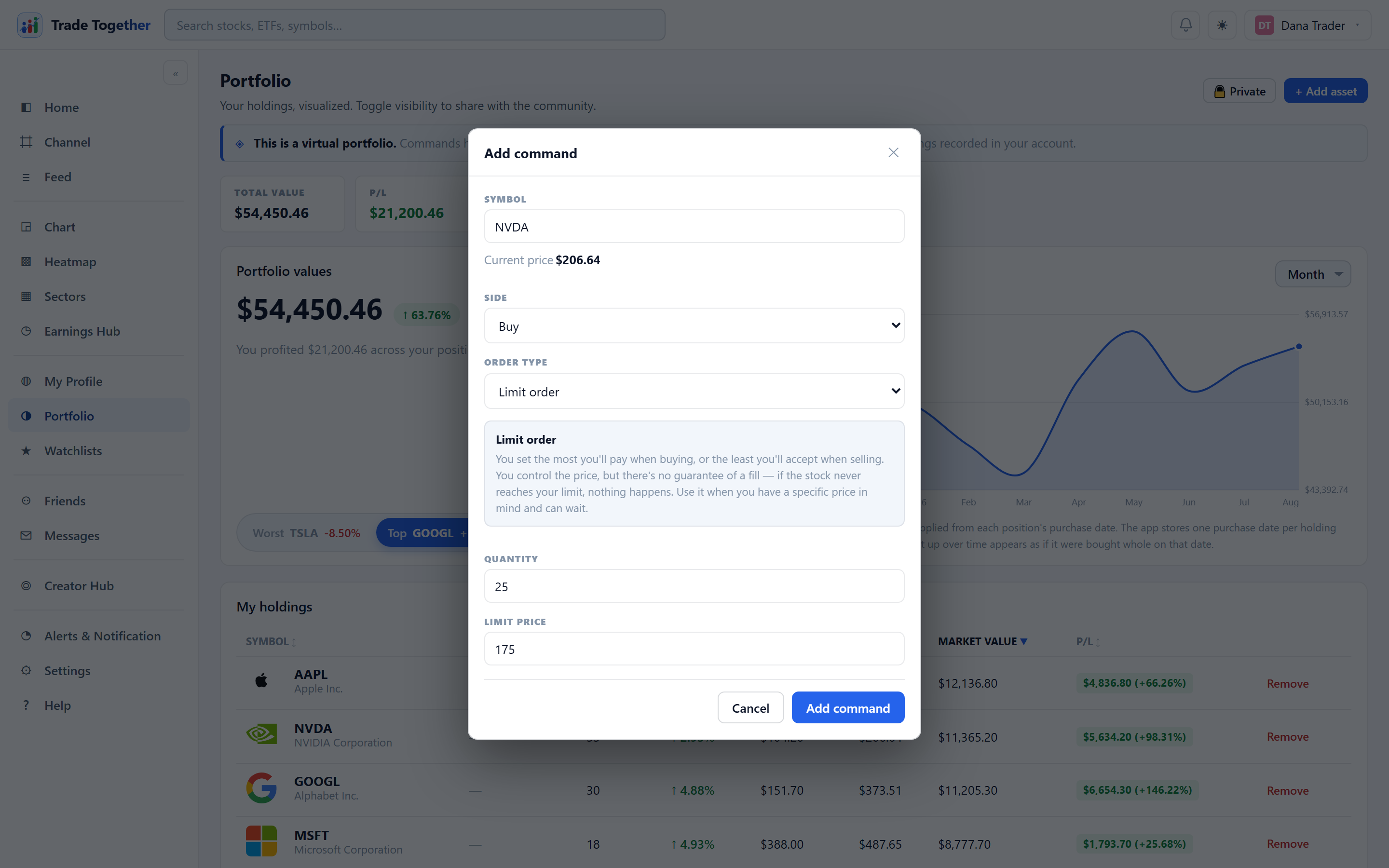
At the bottom of the Portfolio page, Pending Actions is where you place orders, and the Trade log underneath it is the permanent record of the ones that filled.
The Record column says so on every row, and it always will — there is no way to place an unverified command. We supply the price from our own live quote, we stamp the time, and a fill writes a trade-log entry nobody can edit.
Recording a holding you already owned before you joined is the other path entirely: it goes straight into your portfolio as a not-verified position and never becomes a command, which is why it never appears here.
Finding a row. Both panels open showing the five most recent rows, with a search box in the corner. The arrow at the bottom opens it up to ten, and past ten you get page numbers.
13.1 Placing an order
+ Add command opens the ticket. As soon as you pick a symbol, the current price appears under the box — you should not have to leave the form to find out what the thing costs.
- Side
- Buy or Sell.
- Order type
- Market, limit or stop. Choosing one shows an explanation of that type directly under the selector, and reveals only the price field that type needs.
- Quantity
- Number of shares. Must be greater than zero.
The three types:
- Market order
- Buys or sells at the best price currently available. Fast and almost always fills, but you do not control the price — in volatile or thinly traded names the fill can land well away from the last quote.
- Limit order
- You set the most you will pay, or the least you will accept. You control the price, but there is no guarantee of a fill: if the stock never reaches your limit, nothing happens.
- Stop order
- Sits dormant until the stock touches your stop price, then becomes a market order and fills at whatever comes next. Used to cap a loss or protect a profit.
13.2 When orders are actually checked
Market orders execute immediately while the market is open. Limit and stop orders are checked against live prices every five minutes while the app is open in a browser tab, and again each time you open the Portfolio page. They are not evaluated against every trade the way a real broker's system would be.
Two consequences. A limit order can sit pending straight through a price it "should" have caught, if the price touched and recovered between two checks. And nothing is checked at all while every tab is closed.
A market order placed out of hours does not fill at the last closing price. It stays pending, tells you when trading starts, and fills at the price the stock actually opens at — the same thing a real broker does with an order you place overnight.
This matters more than it looks. While the market is closed the last price is a number you can already read, so filling at it would be a trade with no risk in it at all — and it would count towards a verified track record. Waiting for the open is what keeps those records worth believing.
A pending order can be cancelled any time before it fills — the Cancel button on its row. Pending orders are listed first, because they are the only ones you can still do anything about.
When a buy fills, the shares are added to your portfolio and blend into your average cost. When a sell fills, the position shrinks, and closes entirely when nothing is left.
13.3 The trade log
Every fill is written here automatically, with the date and time, what was bought or sold, the price it filled at, and whether you placed it directly or the automatic check caught it. Every row also carries Record, which reads verified.
It reads the same on every line on purpose. An entry is written by the app when a command fills — never typed, never composed on a form — using our price and our timestamp. A position you recorded yourself never reaches this log at all: that path writes straight to your portfolio as a not-verified holding and touches nothing here. So no line in this table can be a claim you made about your own past.
The blue stripe down the left is the same blue as the verified group in your holdings table, and means the same thing. Pending Actions uses green, yellow and grey instead, because up there the question is where a command has got to — here everything has already happened.
Entries can never be edited or deleted. Not by you, and not by an administrator. There is no delete button because the database itself refuses the operation. This is the feature, not a missing control.
The reason is public portfolios: a track record is only worth something if the losses are still in it. A log anybody could prune would tell you nothing about the person who pruned it.
Your log is private to you unless you switch your portfolio to public, in which case anyone can read it.